

 LinkedIn
Finding the prompts that trigger brand mentions is search-term mining under a new name: start with your own sales questions, log the answers, and review the gaps every week. Buy a monitoring dashboard before you know which 60 questions matter, and you have paid to automate a blank page.
Swipe 1: Build Your 60-Prompt Seed List
1. Problem-aware questions: catch buyers before they name a category
When to use it: Use these when buyers can describe a broken workflow but have not settled on a type of vendor. These are unbranded questions, so a mention tells you more than an answer to a prompt that already contains your name. Unbranded and branded prompts produce very different mention rates; do not mix them in one score.
1. How do mid-sized [industry] teams fix [specific pain point] without adding headcount?
2. What workflow fixes [bottleneck] when scaling from [milestone a] to [milestone b]?
3. Why is our [metric] dropping after implementing [process or legacy tool], and how do we solve it?
4. What are the best methods to eliminate manual [task] for a [team size] [role] team?
5. How can a [role] prevent [frequent error] during [critical operation]?
6. What causes high [waste or drop-off] in [business type], and what fixes it fastest?
7. How do we audit [department function] to uncover hidden [inefficiency] in [system]?
8. What is the standard playbook for managing [business function] without [outdated method]?
9. How do companies like [similar company type] handle [operational challenge] under [constraint]?
10. What should we change if our [current strategy] generates clicks but no [sales pipeline or revenue]?
11. How can [target role] cut time spent on [manual task] each week?
12. What steps fix broken attribution between [channel a] and [channel b] in [industry]?
13. Why do [industry] businesses struggle with [specific issue], and what resolves it?
14. How do we automate [repetitive task] without breaking compliance in [industry]?
15. What causes [business model] customer churn during [onboarding stage]?
The one adjustment that matters: Replace [specific pain point] and [bottleneck] with the unvarnished language in sales calls and CRM notes. Product-page phrases are usually too tidy to sound like a buyer with a problem.
2. Comparison questions: see who makes the shortlist
When to use it: Use these when buyers know the category and are comparing vendors. Unbranded category prompts can be hard to win, which makes them a useful test: does the answer recommend you, cite you, or skip you? Keep the wording consistent when you run the same prompt across engines.
16. Top 5 alternatives to [competitor brand] for [company profile] that do not charge [pricing model]?
17. [Competitor a] vs [competitor b] vs [your category]: which fits [business use case]?
18. What software replaces [legacy tool] for managing [operation] when [requirement] is non-negotiable?
19. Which [product category] platform offers [capability] without [complex setup]?
20. What are the most reliable tools for [workflow] used by [role] in [industry]?
21. Compare [market leader] with newer autonomous options for [channel or objective].
22. What are the downsides of using [popular competitor] for [team size or industry]?
23. Who are the emerging competitors to [incumbent vendor] in [region or segment]?
24. Best [service or tool category] for [business model] spending [monthly budget range] on [operational area]?
25. Which [category] providers include [critical capability] in their base tier?
26. What do [industry] operators switch to after outgrowing [entry-level software]?
27. How does [competitor brand] compare with newer alternatives on [performance metric]?
28. What is the best [service or software] stack for a [role] managing [scale] alone?
29. Which vendors in [space] provide dedicated [support tier] rather than self-serve ticketing?
30. What are the highest-rated solutions for [technical bottleneck] according to peer reviews?
The one adjustment that matters: Do not invent your comparison set from a keyword tool. Pull competitor pairings and feature objections from sales calls and closed-won notes. If a buyer repeatedly puts your pricing model beside a legacy tool’s, that pairing goes in the sheet.
3. Price questions: find the objections before the buyer calls
When to use it: Use these when a budget holder is weighing cost, contract flexibility, and fees beyond the headline price. Log what the answer actually says, not just whether it names you. A mention paired with an inaccurate contract warning is not a win.
31. How much does a typical [service or software category] cost for a company at [revenue tier]?
32. What is the total cost of [competitor brand] over two years, including onboarding and add-ons?
33. Is [category] worth the money for a [team size] [industry] business, or is [alternative] cheaper?
34. What fees do [category] agencies or platforms charge beyond their headline retainer?
35. How do [industry] companies justify the ROI of [solution type] to a CFO or board?
36. What is the difference between a flat-fee [service] and a percentage-of-spend contract in [channel]?
37. Are there free or low-cost alternatives to [competitor tool] that handle [critical feature]?
38. What is the typical payback period for [software or growth engine] in [business type]?
39. Does [competitor brand] require an annual contract, or offer month-to-month terms?
40. What percentage of spend might a [business size] company pay for [management service]?
41. How do we calculate expected pipeline return on [monthly budget] in [acquisition channel]?
42. Is it cheaper to build an in-house [discipline] team or hire an autonomous [engine or partner]?
43. What happens to campaign data and account assets if we cancel [competitor]?
44. Why do some [category] vendors charge setup fees while others offer pilots or trials?
45. Which contract and cancellation terms matter when vetting [category] vendors?
The one adjustment that matters: Replace generic contract terms with the ones buyers ask about. If an answer misstates your pricing or cancellation terms, record the exact claim before deciding whether your public pricing page needs a clearer answer. Do not assume every wrong answer has the same cause.
4. Local and constraint-driven questions: test the hard limits
When to use it: Use these when a buyer needs a particular location, integration, service level, or compliance requirement. These prompts expose a different gap from a broad ‘best tools’ query: can an answer establish that you meet the stated constraint? Only use constraints your business can genuinely satisfy.
46. Best [service provider type] in [city or region] with verified emergency response under [time]?
47. Which [business type] near [metro area] supports integrations with [software]?
48. What [service] agencies in [geography] have experience with [regulatory framework]?
49. Find a [service provider] for [niche B2B industry] in [region].
50. Which local [trade or service] companies near me publish upfront pricing and trip fees?
51. What [category] platform meets [specific requirement] and operates in [country]?
52. Can a [business type] with fewer than [headcount] use [category software] without a consultant?
53. Which [service provider] in [market] specializes in stalled [channel] accounts?
54. Which [specialty] firms near [location] offer a dedicated senior strategist?
55. Who provides commercial [service] across franchise locations in [state or province]?
56. Which [category] tools allow custom data retention policies for [sensitive industry]?
57. What [service] firms in [region] offer performance or shared-risk pricing?
58. Find [category] software that runs on [operating system or stack] with offline capability.
59. Best boutique [agency type] in [geography] for ad spend between [bracket a] and [bracket b]?
60. Which local [vendor category] handles same-day deployment for [technical issue] in [city]?
The one adjustment that matters: Use an exact requirement where you have one, not ‘reliable’ or ‘experienced.’ A real service boundary or technical specification gives you something concrete to check against the answer.
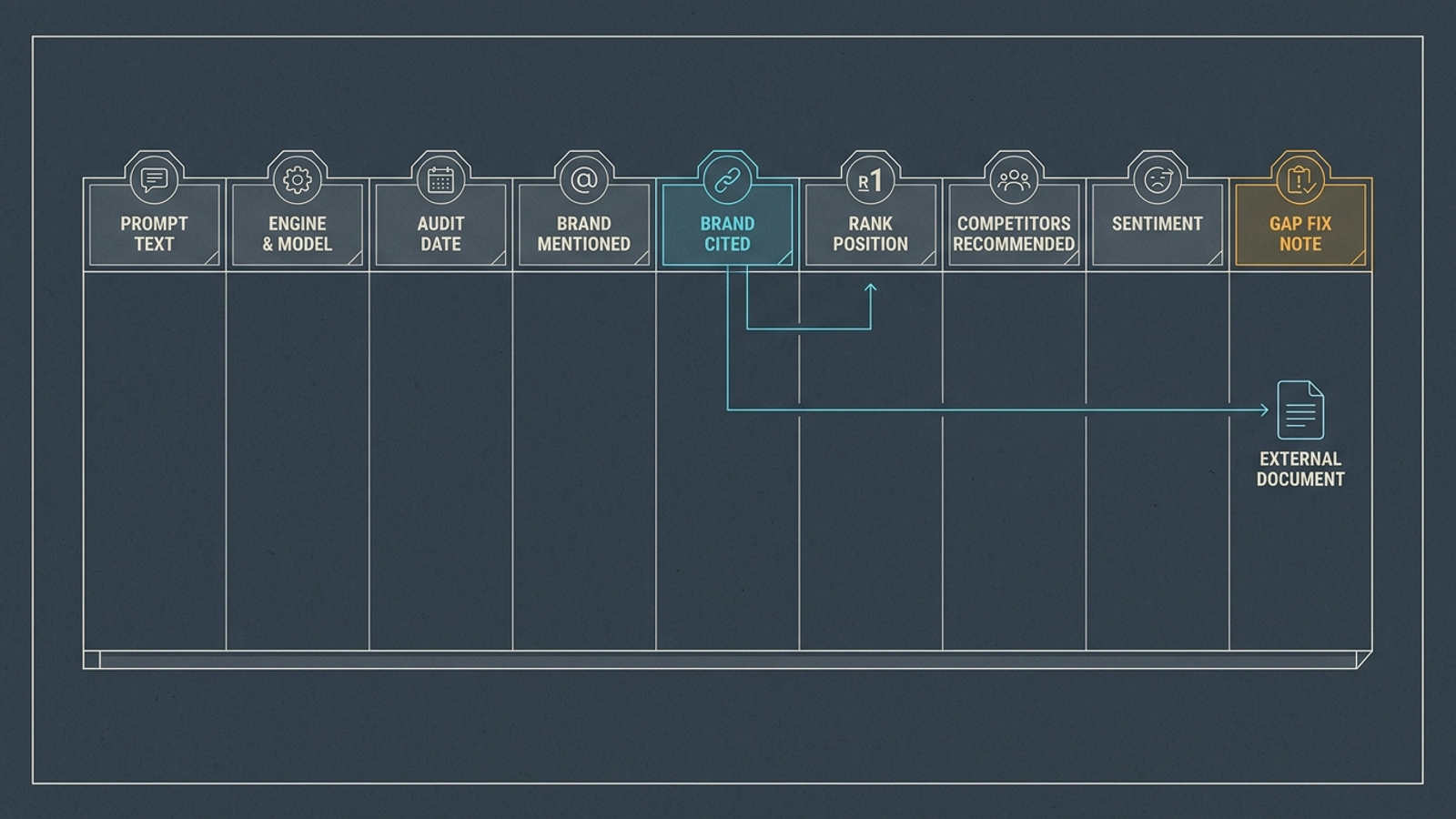
Swipe 2: Set Up the Nine-Column Tracking Sheet
When to use it: Set up row 1 before you run the prompts. Skip the weighted visibility index for now. The answer, its links, and the competing names give you enough to decide what to investigate next; cited URLs and competitor recommendations are especially useful audit notes.
- A — Prompt Text: Paste the exact query. Keep it unchanged between runs unless you deliberately start a new version.
- B — Engine & Model: Record the surface you tested, such as ChatGPT, Perplexity, Gemini, or Google AI Overview, with the model when available.
- C — Audit Date: Record when you ran it so later answers have a usable timeline.
- D — Brand Mentioned (Y/N): Mark whether the answer names your business, regardless of where it links.
- E — Cited Source URL: Paste a link to your domain if the answer supplies one. Otherwise leave it blank; a third-party link belongs in the gap note.
- F — Rank Position: Enter your position in a recommendation list: 1 for first, 3 for third, 0 if omitted. Leave it blank if the answer has no ranked list.
- G — Competitors Recommended: List the other brands named in the answer.
- H — Sentiment & Context: Record the score from Swipe 3 and a short description: primary pick, alternative, or warning.
- I — Gap Fix Note: Record the missing answer or asset and any competitor source URL worth examining.
The one adjustment that matters: Add dropdowns to Columns B and D. Repeatedly typing engine names and yes/no entries is small friction until it is the reason nobody updates the sheet.
Swipe 3: Score Mentions Separately From Citations
When to use it: Use this rubric in Column H after each run. A mention is not a citation: the answer can name you without linking to your site, or link to a directory instead. Those are different visibility outcomes, and unlinked use of a brand’s material creates an attribution gap. Do not give every appearance the same score.
- 0 — Invisible: Your brand is absent, and no competitor is recommended either.
- 1 — Competitor dominated: Your brand is absent; at least one competitor is recommended or cited.
- 2 — Unlinked mention: Your brand appears, but the answer provides no link to your domain.
- 3 — Indirect link: Your brand appears with a link to a third-party page, not your domain.
- 4 — Direct link: Your brand appears with a link to a relevant page on your domain.
- 5 — Primary pick: Your brand is the first recommendation, linked to your domain, without a warning against it.
The one adjustment that matters: For a 2 or 3, log the actual link or missing link before writing a fix. An unlinked name tells you where to investigate; it does not prove that one particular page change will earn a citation.
Swipe 4: Run a Weekly 45-Minute Pass
When to use it: Reserve roughly 45 minutes each week for a rotating sample, not all 60 prompts across every engine. Start with 20 commercial or price questions and two engines. If you need repeated runs to judge an unstable answer, reduce the number of prompts that week. AI answers can vary between runs, so a single result is a snapshot, not a trend.
- Minutes 0–20 — Test: Run as many of the selected prompts as you can log accurately. Keep the wording fixed. If a Google AI Overview does not appear, record ‘no data,’ not a zero; its appearance can vary by query.
- Minutes 20–35 — Inspect sources: For competitor-dominated answers, copy cited competitor URLs into Column I. If there are no citations, record that rather than guessing where the answer came from.
- Minutes 35–45 — Pick the next pass: Flag answers worth rerunning and add fresh objections from sales calls. Retire a prompt from the weekly rotation when it has stopped teaching you anything, but keep its history and version number.
The one adjustment that matters: Test outside your personal account when you can. Your conversation history or custom instructions can influence an answer; the point is to observe what a buyer might see, not what an assistant has learned to tell you.
When the Manual Sheet Stops Paying for Itself
When to use it: Reassess the routine when the prompt set grows beyond what your team can inspect and act on. The weekly pass above is a sample. A full check of 60 prompts across four engines, repeated three times, would take 720 queries before anyone reads the answers or fixes a gap. That is not a 45-minute Tuesday job. It is a spreadsheet with a staffing problem.
Tracking is not the product; acting on the findings is. groas pairs always-on execution across paid and organic search with a named human strategist who sets direction and owns accountability. If you are logging more than 100 prompts across multiple engines, the useful question is not how to type faster. It is which findings lead to work that changes what buyers see.
Swipe 5: Turn a Gap Into a Work Order
When to use it: Paste this into Column I when an answer skips your brand, recommends a competitor, or mentions you without a direct link. Write down what the answer did before diagnosing why. Otherwise a plausible-sounding fix can outrun the evidence in front of you.
PROMPT: [exact prompt text]
OBSERVED GAP: [brand omitted / competitor recommended / mention without direct link]
COMPETITOR SOURCE: [cited URL, if any]
MISSING ANSWER: [specific claim or requirement the answer did not establish about us]
ACTION REQUIRED: [page or answer to clarify / source to examine / question to verify]
The one adjustment that matters: Make MISSING ANSWER one sentence, specific enough that someone can check whether your site says it plainly. Of the five swipes, this is the one I would keep if I had to lose the rest. A prompt list tells you where you stand; a gap note tells you what to do next.